


1.Go To The Google and Type anvi folder locker.

2. Download Latest Version Of Anvi folder Locker. and Then open the software.

3.download,Install and Open the Anvi Folder Locker.

4. Then You have to set Your Master password Be careful it is case sensitive. then also Enter the Your Email Address it is helpful When You Forgot Your Master Password.

5. Click on Add Button. And Choose the Directory OR Folder Which You Want to Hide and Lock.
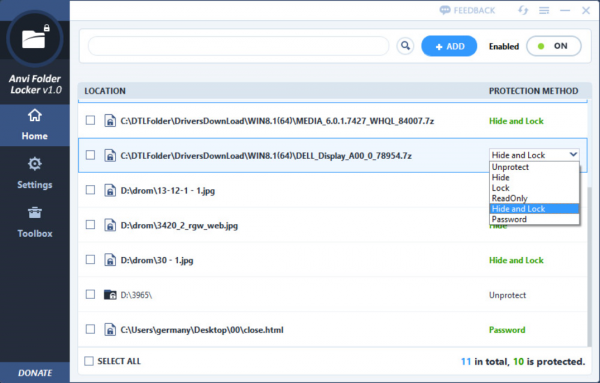
6. click on Hide and Lock DropDown Menu and Choose Password.

7. Then You Have Two Option Default Password Which is Your Master Password and also you provide Custom password for this folder. and click ok button.

8. you have show the 1 item(s) protected green line. And when you open lock folder it shows below dialog box.

9.Here You Enter Your Master Password Or Custom Password.


No comments:
Post a Comment